- Home
- Cart Abandonment Emails That Actually Recover Revenue
Cart Abandonment Emails That Actually Recover Revenue
An abandoned cart email is a message sent after a shopper leaves items in a cart or starts checkout without buying. The point is not to collect opens. It is to recover revenue that would otherwise have been lost, and the only honest way to judge that is by measuring incremental orders and revenue against people who did not receive the recovery flow.
There is a strange thing about abandoned-cart marketing.
Almost every ecommerce platform can show you a big number called “recovered revenue.”
That does not automatically mean the emails caused that revenue.
Some of those shoppers were going to come back anyway. Some opened the email after already deciding to buy. Some received a reminder and ignored it, then returned through Google or direct traffic. If your report gives the email full credit simply because it appeared somewhere before the order, the dashboard can make a mediocre flow look heroic.
So the useful question is not, “How much revenue did Klaviyo attribute to this flow?”
It is, “How much more revenue did this flow create than we would have earned without it?”
That is a harder question. It is also the one that matters.
What “Actually” Recovering Revenue Means
Cart recovery is incremental when the email changes what the shopper does. If 1,000 abandoners would have produced 80 purchases on their own, and 1,000 comparable abandoners who receive the flow produce 105, the flow created roughly 25 incremental orders. The rest were going to happen anyway.
This distinction matters because ecommerce buyers often leave without rejecting the product. They compare tabs. They get interrupted. They wait until payday. They check shipping. They ask someone else. They come back from another device.
Baymard Institute’s checkout research has tracked cart abandonment for years and consistently finds that a large share of shopping carts never turn into orders. Its broader research also shows why: some people were only browsing, while others hit preventable friction such as unexpected costs, forced account creation, slow delivery, trust concerns, or a checkout that simply felt like too much work.
An email can help with some of those reasons.
It cannot fix all of them.
If shipping is suddenly $28 at checkout, three clever emails will not make the surprise less annoying. If the payment button fails on mobile, a reminder only sends the shopper back to the same problem. If the product page never answered a basic sizing question, the email should probably answer it rather than repeat “You left something behind.”
This is why cart recovery sits inside conversion rate optimization, not outside it. The email is one part of the system. If the underlying leak is on-site, fix the leak too.
Cart Abandonment vs. Checkout Abandonment Emails
People use “cart abandonment” and “checkout abandonment” as if they describe the same moment. They do not.
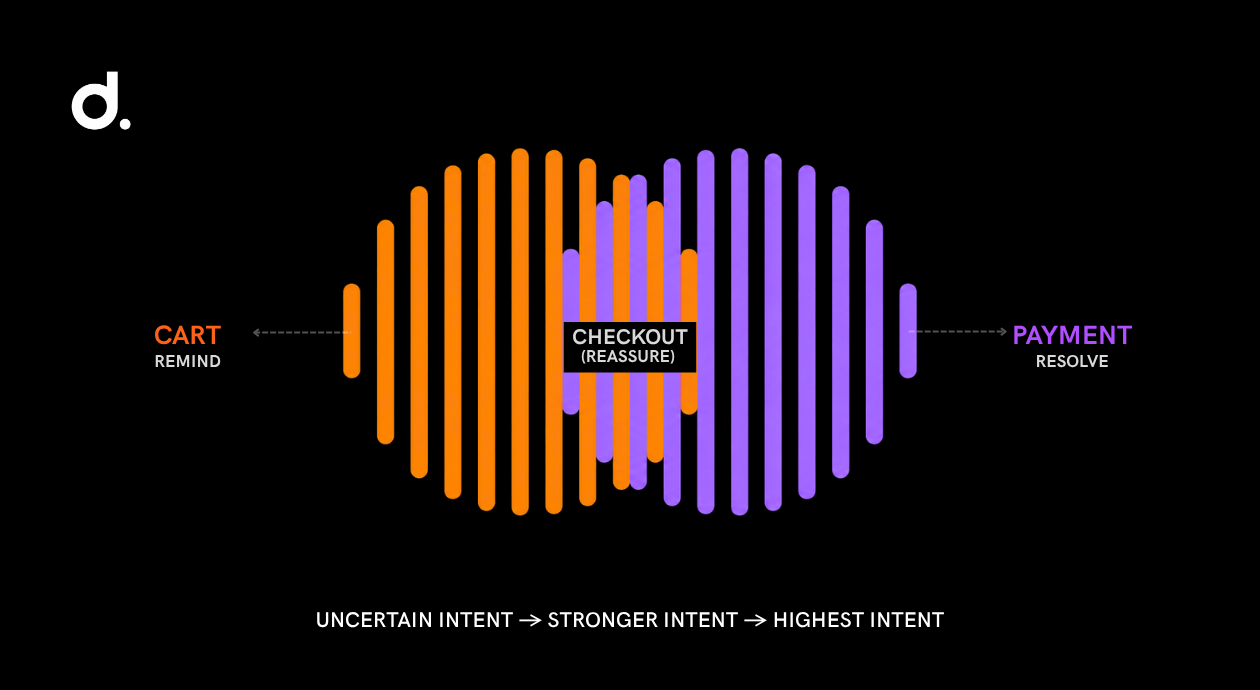
A cart abandoner added something but may never have reached checkout. A checkout abandoner has moved further, often entering contact information, shipping details, or payment information before leaving.
That difference changes the message.
| Shopper state | What you know | What the email should do |
|---|---|---|
| Added to cart, did not begin checkout | Product interest exists, buying intent is uncertain | Remind, restore the cart, answer product questions |
| Began checkout | Intent is stronger and friction is more likely | Restore checkout, clarify delivery/returns/costs, remove hesitation |
| Entered payment details but did not purchase | Very high intent or a technical/payment problem | Make return simple, offer support, flag payment alternatives if relevant |
Do not send the exact same sequence to all three groups if your platform lets you separate them.
The person who browsed for five minutes does not need the same urgency as the person who entered a card number and hit an error.
The Recovery Sequence: Timing, Structure, Escalation
There is no magic send time that works for every store. Current Klaviyo guidance recommends waiting a few hours before the first abandoned-checkout message and spacing later messages farther apart. Its current help documentation suggests roughly two to four hours for the first reminder and around 20 to 48 hours before a second message.
That is a useful starting point, not a law.
A $25 skincare purchase and a $2,000 piece of furniture have different buying cycles. A customer ordering flowers for tomorrow and a customer considering a new laptop behave differently. Test timing against your own purchase window.
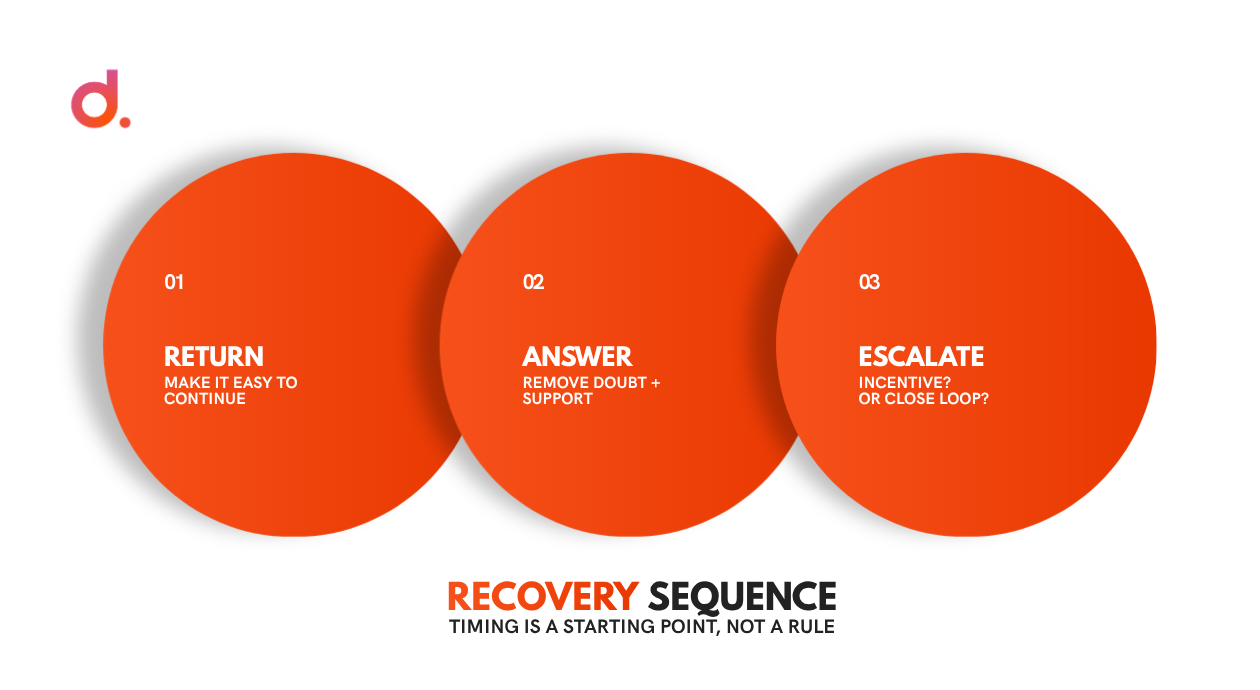
A practical three-email structure looks like this.
Email 1: Make It Easy to Return
The first email does not need a discount, a countdown timer, or a paragraph about how devastated the cart feels.
Its job is simple: reduce the work required to continue.
Include:
- The product or products left behind.
- A direct button that restores the cart or checkout.
- Price and selected variant, if available.
- A short reminder of the most important buying detail.
- Support access if the shopper had a question.
Subject lines can be plain:
- Still thinking it over?
- Your cart is saved.
- Pick up where you left off.
- Still want this?
The email should feel like a useful bookmark, not a panic alarm.
Email 2: Answer the Reason They May Have Left
The second message should do something the first one did not.
This is where weak flows become repetitive. They send the same product image again, change the subject line, and call it a sequence.
Instead, use the second email to handle uncertainty.
Depending on the store, that may mean:
- Delivery timing.
- Returns or exchanges.
- Sizing or compatibility.
- Product reviews.
- A comparison with a similar option.
- A reminder of stock availability, only if the information is real.
- A customer-service route for questions.
If your support team keeps receiving the same pre-purchase question, that question belongs in the recovery flow.
Email 3: Escalate Carefully
By the third email, the shopper has had time to buy without help.
Now you can decide whether the economics justify an incentive or whether the better move is simply to close the loop.
Options include:
- A modest time-limited discount.
- Free shipping if margin allows it.
- A lower-priced alternative.
- A final reminder with no incentive.
- A “need help?” message rather than another sales push.
Do not assume a coupon is required. Many stores are training customers to abandon because shoppers learn that leaving the cart triggers 10% off.
That is not recovery. That is a discount habit you created yourself.
Should the First Abandoned Cart Email Include a Discount?
Usually, no.
Start by trying to recover the order without giving margin away. If a shopper was interrupted or needed a reminder, you just paid for a conversion that may have happened at full price.
Discounts make more sense when three conditions are true:
- The shopper has not returned after one or two useful reminders.
- Your margin can absorb the incentive.
- A controlled test shows the incentive creates enough incremental profit to justify the cost.
Notice the word profit.
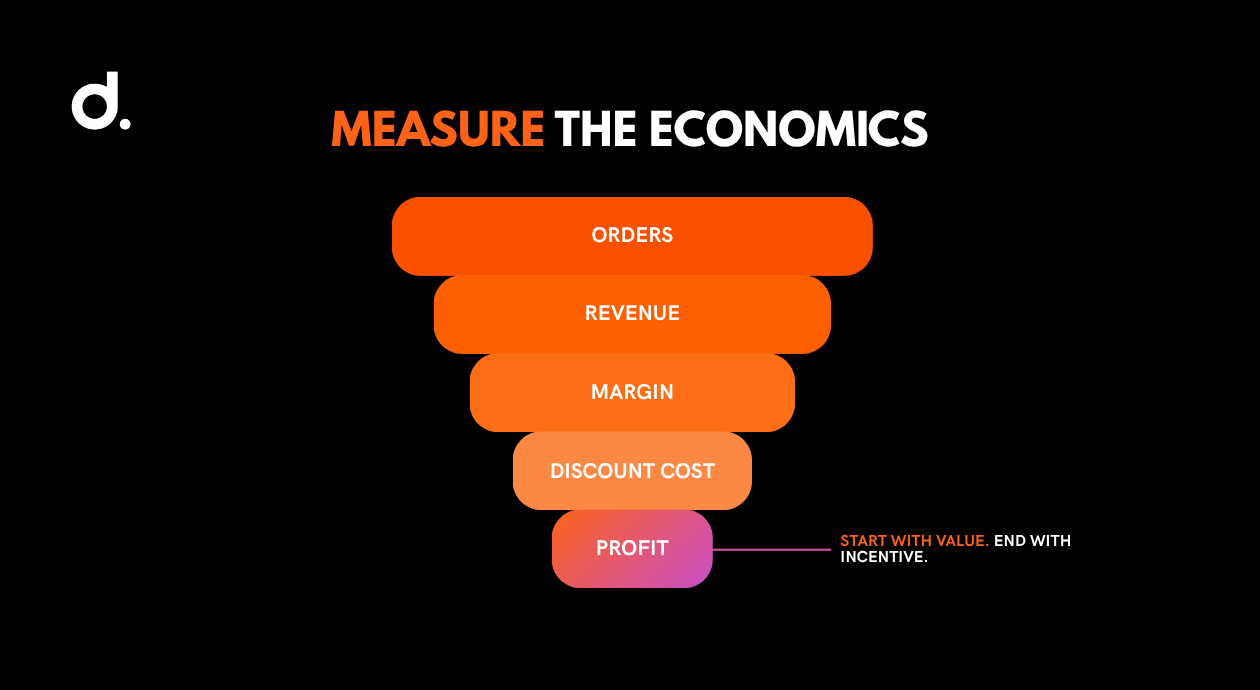
A 15% coupon may produce more orders while making the flow less profitable. If the additional sales only replace full-price purchases you would have received anyway, the “recovered revenue” line can rise while actual economics get worse.
Measure net revenue, gross margin, discount cost, refunds, and repeat purchase behavior when you test incentives.
Subject Lines: Specific Beats Clever
Cart email subject lines have one job: give the shopper a reason to reopen a purchase they already considered.
That means clarity usually beats wordplay.
A useful subject line can reference:
- The saved cart.
- The product name.
- A question the shopper may still have.
- Delivery timing.
- A genuine expiration, if one exists.
Avoid fake scarcity and fake urgency. “LAST CHANCE!!!” is not credible if the same product is still there next week.
Also remember that the subject line is part of a commercial email. Under the US CAN-SPAM Act, commercial messages need accurate header information, non-deceptive subject lines, a valid physical address, a clear opt-out mechanism, and timely honoring of opt-out requests. The law does not disappear because the email is automated.
The Compliance Problem With “Anonymous” Cart Recovery
Some tools advertise the ability to identify visitors before they explicitly enter an email in the current session. That can be useful, but it is also where teams get careless.
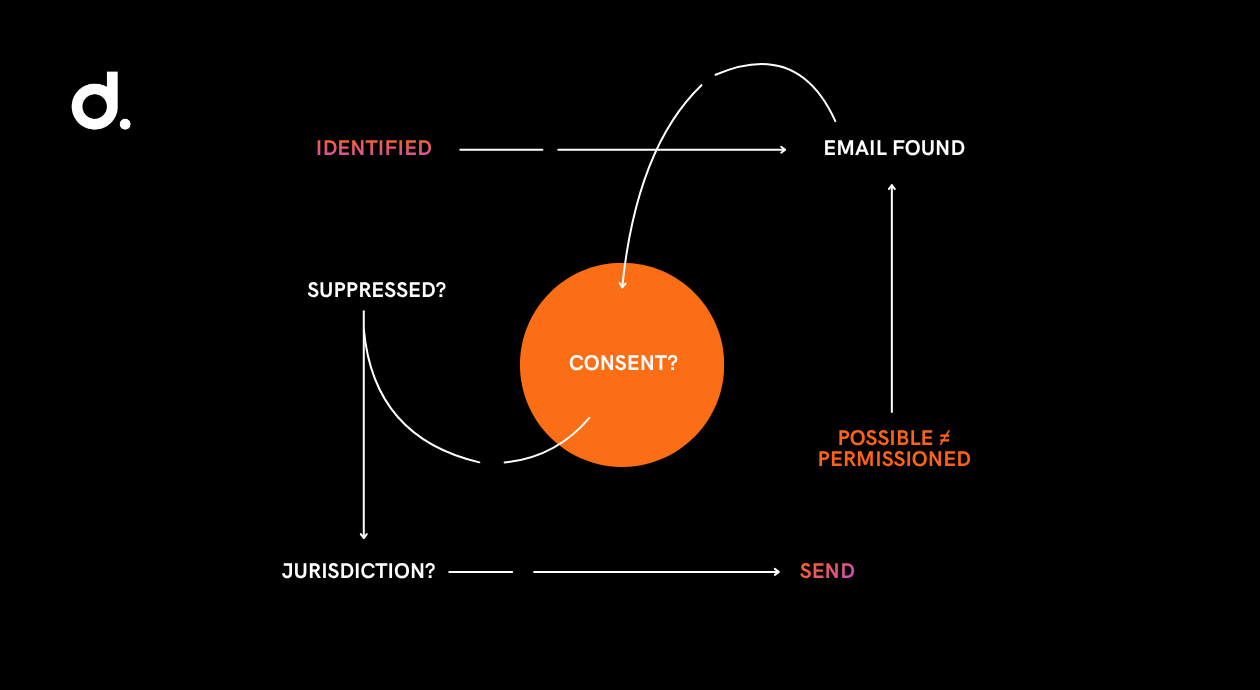
The question is not only, “Can the platform send this?”
Ask:
- Where did the email address come from?
- Did the shopper previously provide it?
- What consent or legal basis applies in the customer’s jurisdiction?
- Does the platform suppress unsubscribed contacts?
- Are privacy disclosures accurate?
- Is the person receiving a commercial message they would reasonably expect?
CAN-SPAM is only one layer. Other jurisdictions and privacy laws can impose stricter consent rules. If a vendor promises “anonymous visitor identification,” have legal or privacy counsel review the setup instead of treating the vendor’s feature list as legal advice.
A technically possible email is not automatically a permissioned email.
How to Measure Whether Cart Emails Actually Work
This is the section most recovery guides skip because the platform dashboard already gives you a neat number.
Do not stop there.
1. Use a Holdout Group
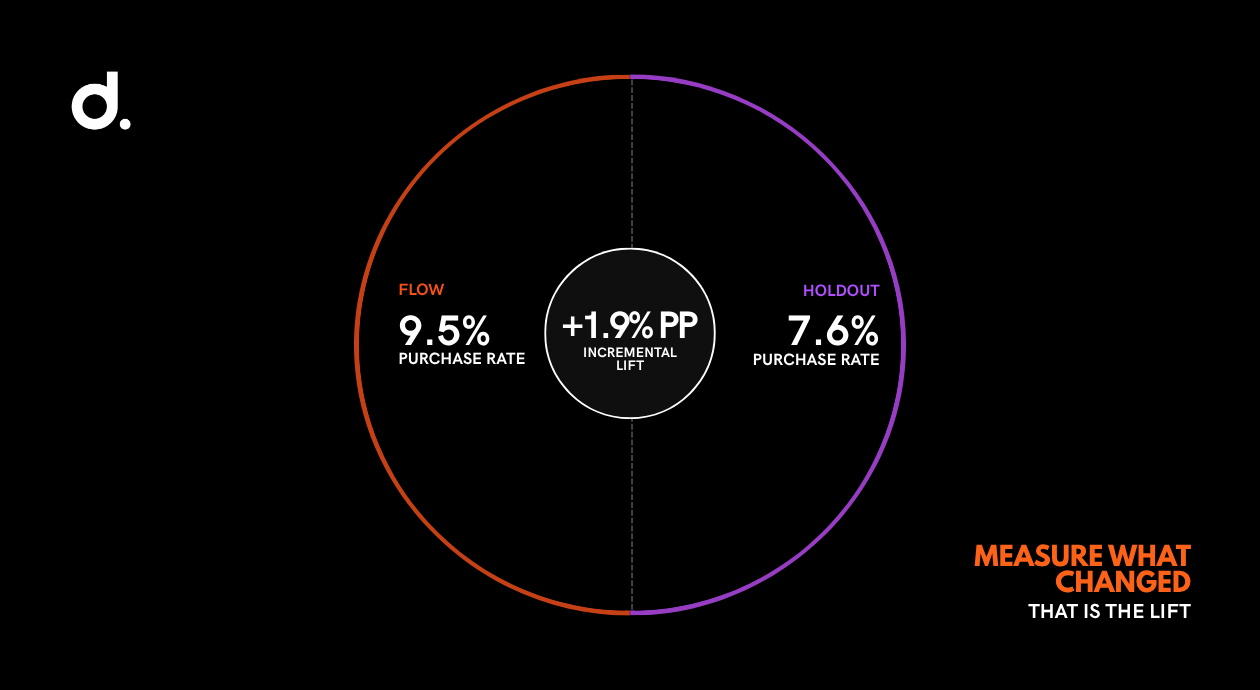
A holdout group is a small percentage of eligible abandoners who do not receive the flow.
Compare the purchase rate and revenue of the messaged group with the holdout. The difference gives you a much cleaner estimate of incremental lift.
Example:
| Group | Eligible abandoners | Purchases | Purchase rate | Revenue |
|---|---|---|---|---|
| Recovery flow | 5,000 | 475 | 9.5% | $38,000 |
| Holdout | 500 | 38 | 7.6% | $3,040 |
If the holdout purchase rate is 7.6% and the flow group is 9.5%, the meaningful lift is about 1.9 percentage points, not the full 9.5% purchase rate.
The numbers above are illustrative. Use your own data.
2. Track Revenue per Recipient
Open rate can tell you whether the subject line gets attention. Click rate can tell you whether people return.
Neither tells you whether the flow earns money efficiently.
Revenue per recipient is better because it forces you to look at commercial output relative to the size of the audience. When testing two versions, compare:
- Revenue per recipient.
- Purchase rate.
- Average order value.
- Discount rate.
- Gross margin where possible.
- Unsubscribe rate.
- Spam complaints.
A version with a lower open rate can still be the better business email.
3. Separate Attributed Revenue From Incremental Revenue
Attributed revenue means the platform’s rules gave the email credit.
Incremental revenue means the email caused additional revenue compared with what would likely have happened without it.
Those are not synonyms.
If your team reports cart recovery to leadership, label the number honestly. “Klaviyo-attributed revenue” is fine if that is what the dashboard shows. Do not quietly rename it “revenue generated by email” unless you have tested lift.
4. Look at the Whole Checkout Funnel
A strong recovery flow can hide a weak checkout.
If abandonment suddenly rises, do not celebrate the larger email opportunity. Check what changed.
Use funnel data, session recordings, customer-service notes, payment errors, device splits, and shipping changes. Our CRO work starts there because sending more reminders is a poor substitute for removing the reason people left.
What to Test First
Do not rebuild the whole flow in one afternoon.
Start with the part most likely to affect incremental revenue.
A sensible order is:
- Confirm the cart/checkout restoration link works on mobile and desktop.
- Check deliverability and suppression rules.
- Test first-send timing.
- Improve the second email around real customer objections.
- Test incentive versus no incentive.
- Add a holdout group.
- Compare revenue per recipient and incremental purchase lift.
If you need ten dashboards to understand the test, the test is too complicated.
Digital Shaping’s email marketing work treats recovery flows as part of the revenue system, not as an isolated email KPI. The point is to find whether the email is fixing a real leak, masking one, or discounting sales that would have happened anyway.
Frequently Asked Questions
What is an abandoned cart email?
An abandoned cart email is an automated message sent after a shopper adds products to a cart or begins checkout but leaves without buying. A good message restores the cart, answers likely objections, and makes returning easy. It should be measured by incremental orders and revenue, not only opens, clicks, or platform-attributed sales.
How many abandoned cart emails should I send?
Two or three messages are a practical starting point for many ecommerce stores. The first can restore the cart, the second can answer objections, and a third can provide a final nudge or carefully tested incentive. More messages are not automatically better. Watch conversion, unsubscribes, complaints, and profit.
When should the first cart abandonment email be sent?
Current Klaviyo guidance suggests a delay of roughly two to four hours after checkout begins for the first reminder, with later messages spaced farther apart. Treat that as a starting point. Product price, urgency, buying cycle, and audience behavior can justify different timing, so test it against your own data.
Should abandoned cart emails offer a discount?
Not immediately by default. First test whether a reminder and better information recover the order at full margin. If you later test a discount, compare incremental profit rather than only conversion rate. A coupon that shifts full-price buyers into discounted orders can increase “recovered revenue” while reducing the value of the flow.
How do I know if abandoned cart emails are actually working?
Use a holdout group whenever your platform supports it. Compare purchase rate and revenue between eligible shoppers who receive the flow and similar shoppers who do not. Also track revenue per recipient, margin, discount cost, unsubscribes, and refunds. That separates true lift from sales the platform merely claimed credit for.
Stop Reporting the Easy Number
Cart recovery is one of the easiest automations to launch and one of the easiest to over-credit.
You can have a beautiful flow, strong open rates, a large “recovered revenue” number, and still not know whether the automation created meaningful additional profit.
Fix that first.
Add a holdout group. Compare the purchase rate. Look at revenue per recipient. Check the checkout itself. If the customer keeps leaving because shipping appears too late, solve the shipping problem before writing email four.
The goal is not to make the recovery dashboard look good.
The goal is to recover revenue that would genuinely have disappeared without you.